How to Play Passenger Airplane: Flight 3D
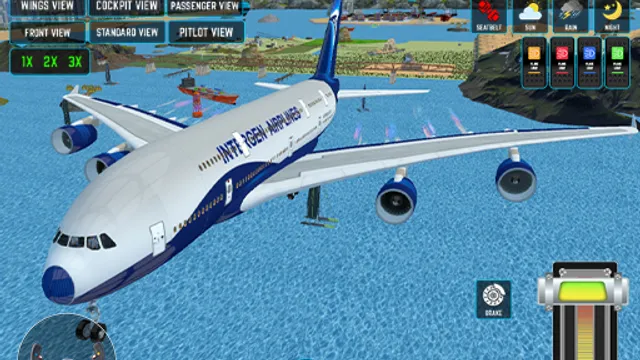
This one trades arcade thrills for the slower pleasures of a cockpit. Two modes are on offer. World Map Mode puts you on real passenger routes across the globe, picking a departure and an arrival and flying the distance between them. Flight Training Mode is the place to learn the basics without a destination riding on it — take off, hold a heading, get a feel for how the aircraft responds before you commit to a proper route. Steering runs through an on-screen joystick by default, and if you’d rather use arrow keys, that option is available in the settings menu.
The flying itself is deliberately unhurried, and the game removes the usual sources of panic: there’s no fuel system, so you can’t run dry halfway across an ocean. What’s left is the actual craft of flying. A throttle slider gives you fine speed control, and 1x, 2x, and 3x settings let you skip through the long stretches of a route. Six camera modes — cockpit, external, a wing view, and others — change how much of the aircraft and horizon you can see, which genuinely affects how well you can judge an approach. Three weather conditions round it out: sunny days are forgiving, rain reduces what you can see, and storms make holding a steady line noticeably harder.
Tips for Smoother Flights
- Start in Flight Training Mode. It exists so you can make mistakes without a route on the line. Ten minutes there will tell you more about the joystick’s sensitivity than an hour of trial and error mid-flight.
- Use the cockpit view for landings. External cameras look great in the air but hide your alignment on approach. Switching to cockpit as you descend gives you the reference points you actually need.
- Speed up the cruise, not the approach. The 2x and 3x settings are there for the boring middle of a long route. Drop back to 1x well before you start descending, or you’ll arrive faster than you can react.
- Make small joystick inputs. Aircraft respond gradually, so a big correction tends to overshoot and start an oscillation. Nudge, wait for the plane to settle, then nudge again.
Frequently Asked Questions
Is Passenger Airplane: Flight 3D free to play?
Yes, it’s free to play directly in your browser.
Do I have to worry about running out of fuel?
No. There’s no fuel system in this game, so you can fly as long as you like without managing a fuel load.
Can I use a keyboard instead of the joystick?
Yes. The default control is an on-screen joystick, but arrow key control can be turned on from the settings menu, and there’s a slider for throttle either way.